
Microsoft has quietly made a major change for Windows 10 users.
Just a few months ago, the company said consumers would only be able to purchase one year of Extended Security Updates (ESU) after Windows 10 reached the end of support on October 14, 2025. Now, that plan has changed.
According to Microsoft’s updated documentation, the Windows 10 Extended Security Updates (ESU) program will now run until October 12, 2027, giving eligible users an additional year of security updates.
For millions of people still using Windows 10, especially those with PCs that can’t upgrade to Windows 11, this is welcome news.
What Is the Windows 10 ESU Program?
The Extended Security Updates (ESU) program allows Windows 10 users to continue receiving critical security patches after the operating system officially reaches the end of support.
Normally, once Windows reaches its end-of-life date, Microsoft stops releasing security updates, leaving systems increasingly vulnerable to newly discovered threats.
ESU changes that, but only for security fixes.
It does not include:
- New Windows features
- Bug fixes unrelated to security
- Performance improvements
- Microsoft technical support
Instead, the program focuses solely on protecting Windows 10 devices from newly discovered security vulnerabilities while users prepare to move to Windows 11 or replace their hardware.
Microsoft Has Extended ESU by One More Year
When Microsoft first introduced ESU for consumers, the company described it as a one-year extension, ending in October 2026.
That is no longer the case.
Microsoft has now officially updated its support documentation to confirm that consumer ESU coverage will continue until October 12, 2027.
This is a significant policy change.
Historically, Microsoft only offered multi-year ESU programs to business customers. Consumer versions of Windows had never received this level of post-support protection before.
Why Did Microsoft Change Its Mind?
Microsoft hasn’t publicly explained why it extended the program, but several factors likely influenced the decision.
Windows 10 Still Has Hundreds of Millions of Users
Despite Windows 11 being available for several years, Windows 10 remains one of the world’s most widely used desktop operating systems.
Many users simply haven’t upgraded yet.
Millions of PCs Can’t Run Windows 11
Windows 11 introduced stricter hardware requirements, including TPM 2.0, Secure Boot, and supported processors.
As a result, many perfectly functional Windows 10 computers cannot officially upgrade.
Rather than forcing users to replace their hardware immediately, Microsoft is giving them additional time.
Hardware Costs Remain High
Replacing a PC has become more expensive than it was just a few years ago.
Higher prices for SSDs, memory, GPUs, and other components have made upgrading less affordable for many households and small businesses.
Extending Windows 10 support helps reduce that pressure.
Who Can Enroll?
The consumer ESU program is available for devices running:
- Windows 10 Home
- Windows 10 Pro
- Windows 10 Pro Education
- Windows 10 Pro for Workstations
Your PC must also:
- Be running Windows 10 version 22H2
- Have the latest Windows updates installed
- Use a Microsoft account with administrator privileges during enrollment
Business-managed devices that already receive ESU through commercial licensing follow a different enrollment process.
How Much Does ESU Cost?
Microsoft offers three different ways to enroll.
Option 1: Free
Enable Windows Settings Backup using your Microsoft account.
Option 2: Microsoft Rewards
Redeem 1,000 Microsoft Rewards points.
Option 3: Pay Once
Purchase ESU for a one-time fee of $30 USD (or the local equivalent).
Regardless of which option you choose, you’ll receive the same security coverage through October 12, 2027.
According to Microsoft, a single ESU license can cover up to 10 eligible devices linked to the same Microsoft account.
How to Enroll
If your device is eligible, enrolling is straightforward.
- Open Settings.
- Go to Windows Update.
- Select Enroll in Extended Security Updates.
- Sign in with a Microsoft account if prompted.
- Choose your preferred enrollment option.
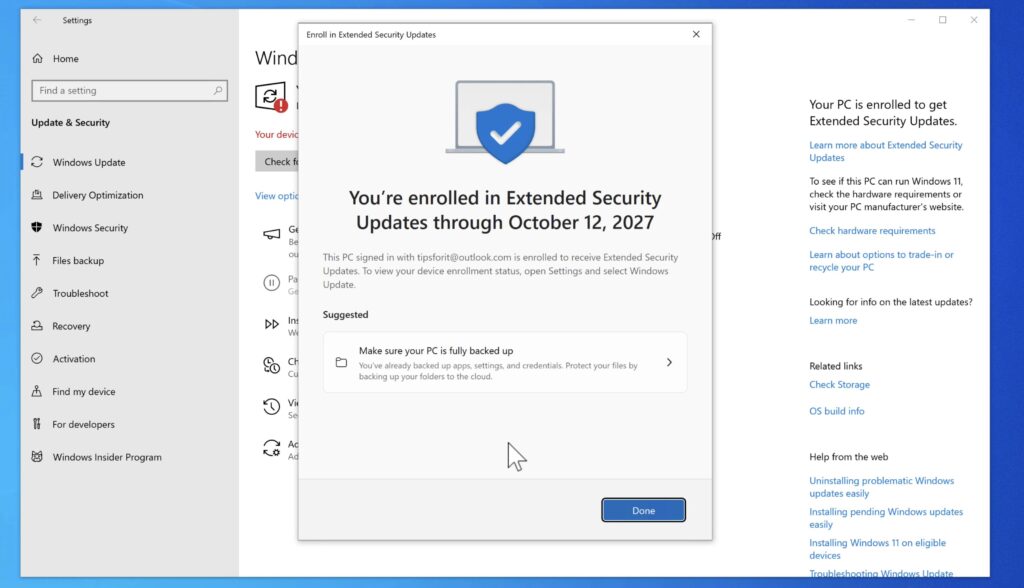
Once enrollment is complete, your device will continue receiving security updates through October 2027.
Do Existing ESU Users Need to Do Anything?
No.
Microsoft says users who are already enrolled in the ESU program will automatically benefit from the extended support period.
No additional purchase or activation is required.
Should You Stay on Windows 10?
That depends on your situation.
If your PC cannot officially run Windows 11, the ESU extension gives you nearly two more years of security updates while you plan your next upgrade.
If your hardware does support Windows 11, upgrading remains Microsoft’s recommended option. However, ESU gives you more flexibility if you’re not ready to make the switch.
And if you’ve already moved to Linux or another operating system, this announcement won’t affect you, but it does show that Microsoft is taking a more flexible approach to Windows 10 than many expected.
See also: Secure Boot 2023: Which Windows PCs Might Miss the Update?
Final Thoughts
Microsoft rarely changes its end-of-support plans after announcing them, making this extension particularly noteworthy.
By extending Windows 10’s Extended Security Updates program through October 12, 2027, the company is giving millions of users extra time to keep their PCs secure without rushing into a hardware upgrade.
For anyone still relying on Windows 10, especially on unsupported hardware, that’s a welcome reprieve.
Whether you decide to stay on Windows 10, upgrade to Windows 11, or move to another operating system, the extra year gives you more time to make that decision on your own schedule.