Microsoft has officially confirmed that Windows 11 version 26H2 is on the way and is expected to arrive in the second half of 2026. But if you’re expecting a major redesign or a long list of new features, you may be disappointed.
Instead, Windows 11 26H2 focuses on something Microsoft has been pushing for years: smaller, faster, and less disruptive updates.
The good news? Installing 26H2 should be almost as simple as installing a regular monthly update.
A Small Update Instead of a Full Upgrade
Unlike the big Windows releases of the past, Windows 11 26H2 will be delivered as an Enablement Package (eKB).
In simple terms, this means Microsoft is already shipping many new features through monthly updates. These features remain hidden in the operating system until Microsoft decides to activate them.
The Enablement Package is simply a small switch that turns these features on.
For users already running Windows 11 24H2 or 25H2, upgrading to 26H2 should involve:
- A tiny download, usually only a few hundred kilobytes.
- One restart.
- A quick installation that takes just a few minutes.
There is no full operating system replacement, no lengthy migration process, and no need to reinstall applications.
Why Is Microsoft Doing This?
Microsoft wants Windows updates to be predictable and easier to manage, especially for businesses.
Because Windows 11 versions 24H2, 25H2, and 26H2 share the same servicing platform, they also share:
- The same source code.
- The same security updates.
- The same quality updates.
- The same application compatibility testing.
The main difference between these versions is simply which features are enabled.
This approach reduces the risk of compatibility issues and allows organizations to deploy updates much faster than in previous years.
Will There Be Any New Features?
Probably, but don’t expect a massive feature dump on release day.
Microsoft now delivers most new features throughout the year via monthly cumulative updates.
Many of these features remain dormant until they are officially enabled.
This means that by the time Windows 11 26H2 is released, some of its new capabilities may already be present on your PC; you just won’t notice them until Microsoft flips the switch.
Recent examples of this strategy include:
- More flexible Windows Update pause options.
- Improvements to the Start menu.
- Additional taskbar customization features.
- AI-powered features gradually rolling out to compatible devices.
So, the annual feature update is becoming less about new features and more about activating improvements that have already been tested.
Hardware Requirements Remain the Same
There’s good news if your PC already runs Windows 11.
Microsoft says Windows 11 26H2 does not introduce any new hardware requirements.
If your computer can run:
- Windows 11 24H2, or
- Windows 11 25H2,
then it should also support Windows 11 26H2 without any issues.
The minimum requirements remain unchanged:
- 4 GB of RAM.
- 64 GB of storage.
- A compatible 64-bit dual-core processor.
- TPM 2.0.
- Secure Boot support.
Windows 11 26H1 Is a Different Story
One thing that may confuse users is the existence of Windows 11 26H1.
Despite the similar name, 26H1 is based on a different Windows core and targets specific hardware platforms, including some next-generation processors such as Snapdragon X2 and Nvidia N1-based systems.
Because of this difference, devices running Windows 11 26H1 cannot upgrade directly to 26H2 through the normal Enablement Package.
Instead, Microsoft says these systems will follow a separate upgrade path in the future.
A Longer Support Lifecycle
For many users, the biggest advantage of Windows 11 26H2 isn’t new features, it’s extended support.
Installing 26H2 resets Microsoft’s support clock.
That means:
Consumer editions
The following editions will receive 24 months of support, until October 2028:
- Home
- Pro
- Pro Education
- Pro for Workstations
Business editions
The following editions will receive 36 months of support, until October 2029:
- Enterprise
- Education
- Enterprise Multi-Session
- IoT Enterprise
For organizations, upgrading to 26H2 is therefore an important step in keeping devices secure and supported.
How to Test Windows 11 26H2 Right Now
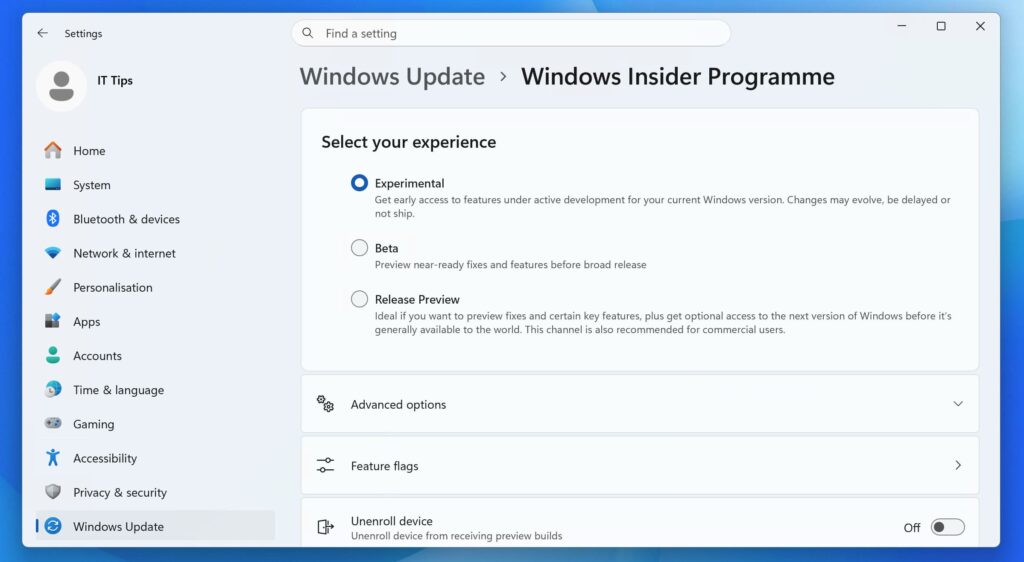
If you don’t want to wait until the public release, Microsoft already offers Windows 11 26H2 through the Windows Insider Program.
Devices enrolled in the Experimental Channel can already receive the update.
You can check your Windows version by:
- Pressing Windows + R.
- Typing winver.
- Pressing Enter.
Alternatively, go to:
Settings → System → About
If you’re currently in the Beta channel, you may also be able to switch to the Experimental channel from:
Settings → Windows Update → Windows Insider Program
When Will Windows 11 26H2 Be Released?
Microsoft has not announced an exact release date yet.
However, the company says Windows 11 26H2 will arrive during the second half of 2026, most likely in the fall, following the same schedule as previous annual updates.
Once available, the update will appear through the usual channels, including:
- Windows Update
- Microsoft Intune
- Windows Autopatch
- Windows Server Update Services (WSUS)
See also: Secure Boot 2023: Which Windows PCs Might Miss the Update?
Final Thoughts
Windows 11 26H2 may not be the most exciting Windows release ever, but that’s exactly the point.
Microsoft is moving away from massive operating system upgrades and toward a model where new features arrive gradually throughout the year.
For most users, upgrading to 26H2 will be quick, painless, and almost invisible.
And with support extended through 2028 or even 2029 for businesses, it may be one of the easiest Windows upgrades Microsoft has ever released.