
Not every Windows PC is guaranteed to receive the new Secure Boot 2023 certificates. Older computers, devices with outdated BIOS or UEFI firmware, unsupported Windows 10 systems, and unofficial Windows 11 installations are the most likely to run into problems.
A Major Change Is Coming to Windows Security
Microsoft is rolling out the new Secure Boot 2023 certificates, which will gradually replace the certificates that have been used since 2011.
For most modern PCs, the transition should happen quietly in the background. But for older or poorly supported systems, things may not go as smoothly.
Here’s why: Windows can download the new certificates through Windows Update, but the computer’s firmware, its BIOS or UEFI, must also support and properly install them.
If the manufacturer no longer provides firmware updates for your device, Windows cannot complete the process on its own.
Which PCs Are Most at Risk?
1. PCs With Outdated BIOS or UEFI Firmware
The biggest risk isn’t necessarily an old computer.
The real issue is whether the manufacturer still supports the device. If BIOS or UEFI updates are no longer available, the new Secure Boot 2023 certificates may never be installed.
Manufacturers such as Dell and ASUS have already published lists of supported devices and the minimum BIOS versions required. If your PC is no longer receiving firmware updates, it could remain stuck with the older 2011 certificates.
2. PCs Still Using Legacy BIOS Mode
Some computers still boot using Legacy BIOS mode or CSM (Compatibility Support Module).
This compatibility mode allows a modern UEFI system to behave like an older BIOS-based computer, often to support older operating systems or drives.
The problem is that Secure Boot was designed to work with modern UEFI firmware.
If your PC is running in Legacy mode, the Secure Boot 2023 update may not be available at all.
3. Unsupported Windows 10 Systems
Not all Windows 10 computers are affected.
However, PCs that are no longer receiving security updates, especially those not enrolled in Microsoft’s Extended Security Updates (ESU) program, may not get the new certificates.
On the other hand, systems that are still supported and have compatible firmware should receive the update without major issues.
4. Unofficial Windows 11 Installations
Many users have installed Windows 11 on unsupported hardware by bypassing Microsoft’s requirements.
These systems often work perfectly fine day to day, but the installation process may have disabled or bypassed important security features such as:
- Secure Boot
- TPM 2.0
- Hardware compatibility checks
Unfortunately, these are the exact components Microsoft is updating today.
As a result, some unofficial Windows 11 installations may experience issues when the new certificates are deployed.
5. Temporarily Blocked Systems
In some cases, the problem isn’t your PC at all.
Microsoft or the device manufacturer may temporarily block the update if a known firmware bug could cause boot problems.
If that happens, there isn’t much users can do except wait for an official fix or firmware update.
What Should You Do If the Update Doesn’t Arrive?
The first step is simple: check whether your manufacturer offers a newer BIOS or UEFI update.
If a firmware update is available, it may be enough to make your PC compatible with Secure Boot 2023.
Otherwise:
- Windows 10 PCs should remain on a supported update channel.
- Unsupported Windows 11 installations may work if Secure Boot can be re-enabled properly.
- PCs that only boot in Legacy BIOS mode or no longer receive firmware updates are unlikely to support the new certificates.
Should You Be Worried?
The short answer is no.
Even if your PC doesn’t receive the Secure Boot 2023 certificates, it won’t suddenly stop working.
Microsoft has confirmed that systems still using the 2011 certificates will continue to:
- Boot normally
- Receive regular Windows updates
- Operate as usual
However, these systems may miss future Secure Boot improvements or certain major Windows features that rely on an updated boot security chain.
See also: Your Windows Secure Boot Certificate Expires in 2026: Check and Fix It Now
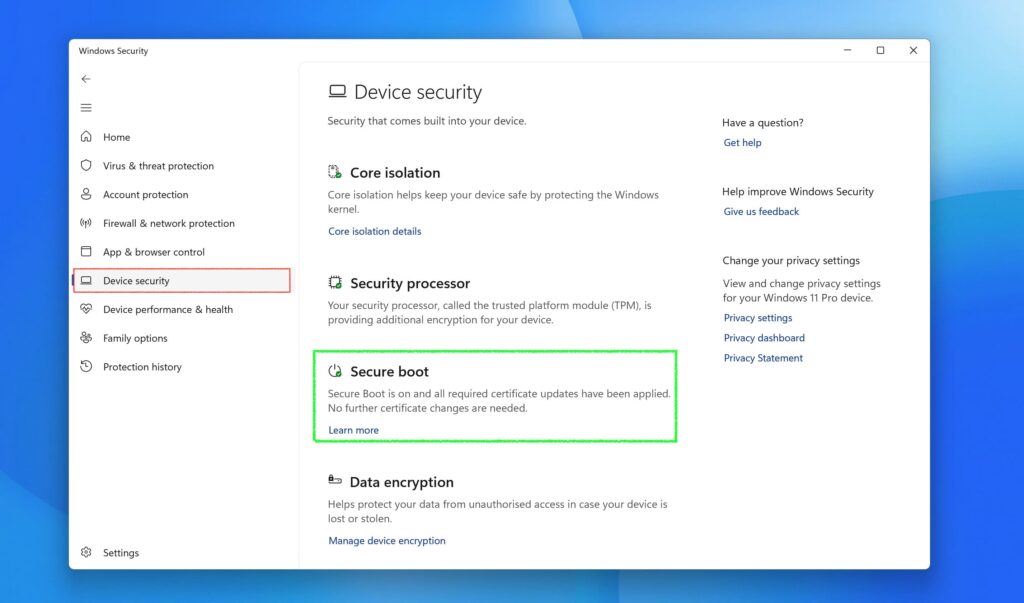
How to Check Your Secure Boot Status
You can verify Secure Boot directly from Windows:
Windows Security → Device Security → Secure Boot
This section shows whether Secure Boot is enabled and whether your PC is using the latest security configuration.
For Businesses, It’s Mostly an Inventory Challenge
For organizations, the issue goes far beyond whether a PC can still boot.
IT teams will need to identify:
- Devices already using Secure Boot 2023
- Systems temporarily blocked from the update
- Older machines that cannot be upgraded
Some devices may only need a BIOS update, while others may have to be replaced or isolated to meet security and compliance requirements.
In mixed environments with both new and old hardware, this transition could take months to complete.

Pingback: Windows 11 26H2 Is Coming: Here's Everything You Need to Know
Pingback: Microsoft Extends Windows 10 Security Updates Until 2027: Everything You Need to Know